
Case study · Mobile · AI operator
Audiva Mobile
Mobile app for bookings, call logs, and contacts
The Audiva operator app. Book on a calendar, review call logs, search contacts, and set up call forwarding. Campaigns start by choosing voice, SMS, or email.
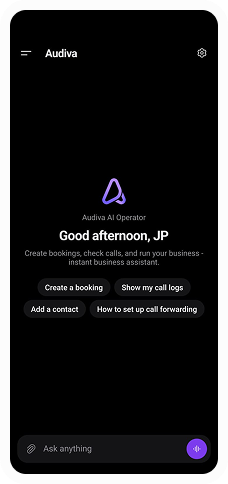
Audiva Mobile home: create a booking, show call logs, add a contact, or set up call forwarding
Challenge
Audiva needed the operator workflow on a phone: a calendar for bookings, call logs with missed and in-progress calls, a contact list, and call forwarding, without opening the web app.
Approach
We built the mobile operator. The home screen starts a booking, opens call logs, adds a contact, or sets up call forwarding. Bookings sit on a month calendar, with that day's appointments listed under it. Call logs filter by missed, active, and in progress. Contacts can be searched and split into active and blocked. A campaign asks which channel to use — voice, SMS, or email — before it goes out. The dashboard shows calls, duration, active agents, missed calls, and recent calls.
Results
- — Bookings on a month calendar, with the day's appointments listed
- — Call logs filtered by missed, active, and in progress
- — Contacts you can search, and mark active or blocked
- — Voice, SMS, or email chosen before a campaign is sent
- Mobile
- Voice
- Contacts